
Count the copies: where your BW data ends up living in Business Data Cloud
Part 3 of 6 on SAP TechEd 2026. Question two from the intro: where does my BW model end up living?
DA200 was the session on SAP’s BW modernization tools, presented together with Fresenius. Slide 7 is titled “Layering SAP BW data as a data product”. At first glance it looks simple. BW on the left, an object store with an inbound space and a customer space in the middle, a view layer on top with two boxes called “Local table (file)”, Apache Spark in a band underneath and zero-copy sharing at the bottom. Trying to understand what physically happens took me some time. Which of these boxes hold data, which ones only read it, what “open table format” means, and what is going on with the view layer? I’ve been building virtual models on HANA for the last ten years, and migrating BW systems to Datasphere for the last year. This slide didn’t fit my mental picture right away.
So I went through it box by box, with SAP Help, SAP’s own blogs and the hands-on exercises next to it. This blog is that walk-through. The short version: there are two copies you can’t avoid, two you might add, and virtual data modeling still is viable.
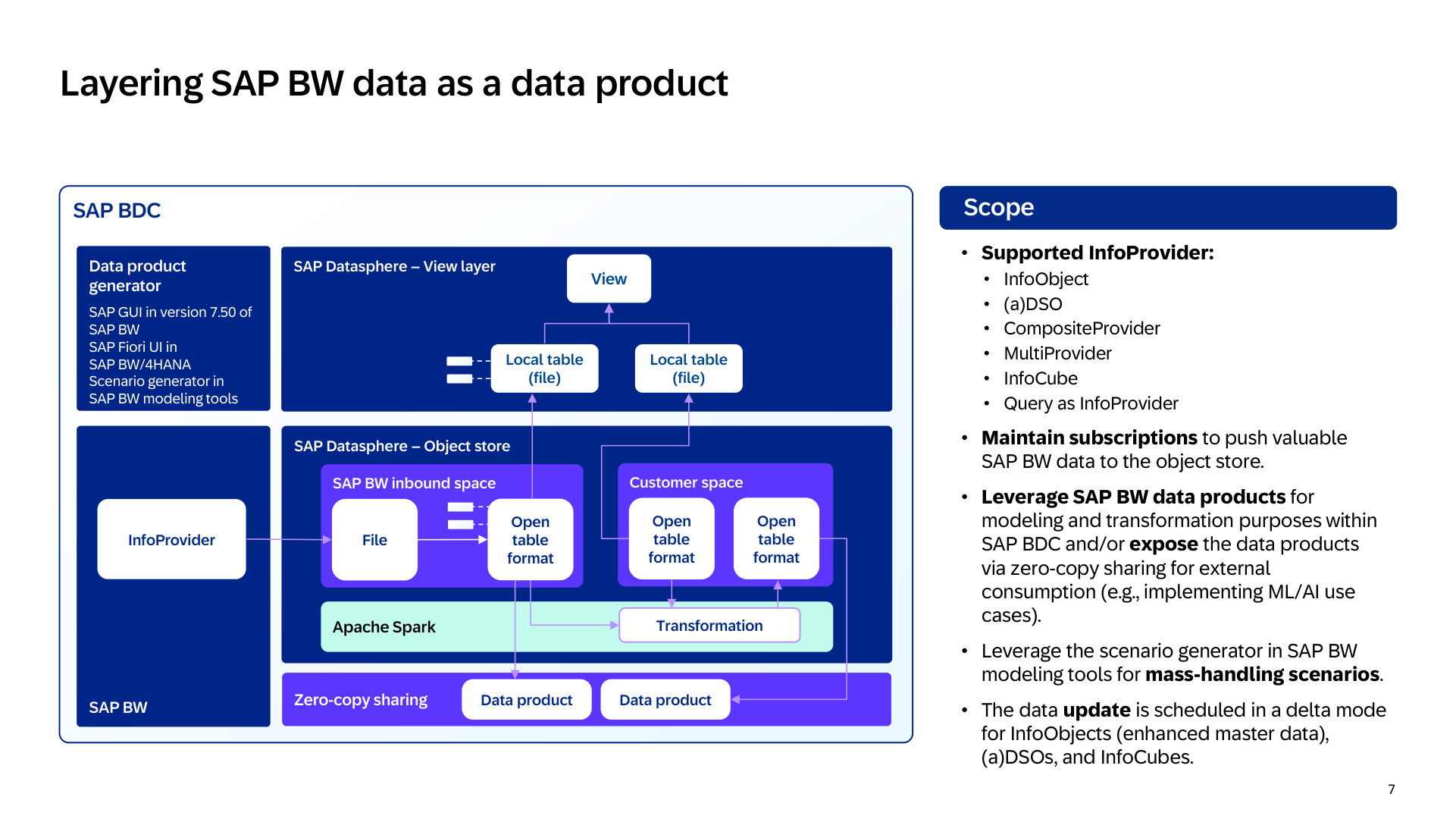
The slide I needed time for. The data product generator pushes an InfoProvider into the object store, and everything after that is a decision. Slide: SAP, session DA200.
What is actually happening on this slide
Start at the left. The data product generator runs inside BW, and you subscribe an InfoProvider to it. For aDSOs, InfoCubes and the master data and texts of InfoObjects the subscription can run in delta mode. Hierarchies always load in full. Since Q1 2026 delta also works for CompositeProviders and MultiProviders, but only under conditions. Anything else loads in full on every run. Every run pushes the new rows as files into a dedicated file space in the Datasphere object store, the “SAP BW inbound space” on the slide. That’s the “File” box: the inbound buffer. New rows wait there, not yet visible, until a merge task folds them into the table, the box called “Open table format”. This merge doesn’t run by itself. You schedule it, or put it in a task chain. Buffer and table together are one object, what Datasphere calls a local table (file). The table is the landing zone for your BW data. So copy one is BW itself, for as long as it runs, and copy two is this table.
From there the slide draws options. The “Customer space” is a second file space with tables of its own. You can combine multiple tables using a transformation flow, which runs on Apache Spark, the band under the spaces. That’s a third copy, and it’s yours to decide. Both file-space tables can be shared outward at the bottom, zero-copy, to Databricks, Snowflake or Dremio. And both can be shared upward into the “View layer”, which is where the two “Local table (file)” boxes come from. Those aren’t new tables. They are the same object-store tables, made visible in a HANA space so that a view can read them. More on that below. Replication flows aren’t shown on the slide, but I suspect one fills the first table in the customer space, the one without an incoming arrow.
Here is the same slide with the copies numbered.
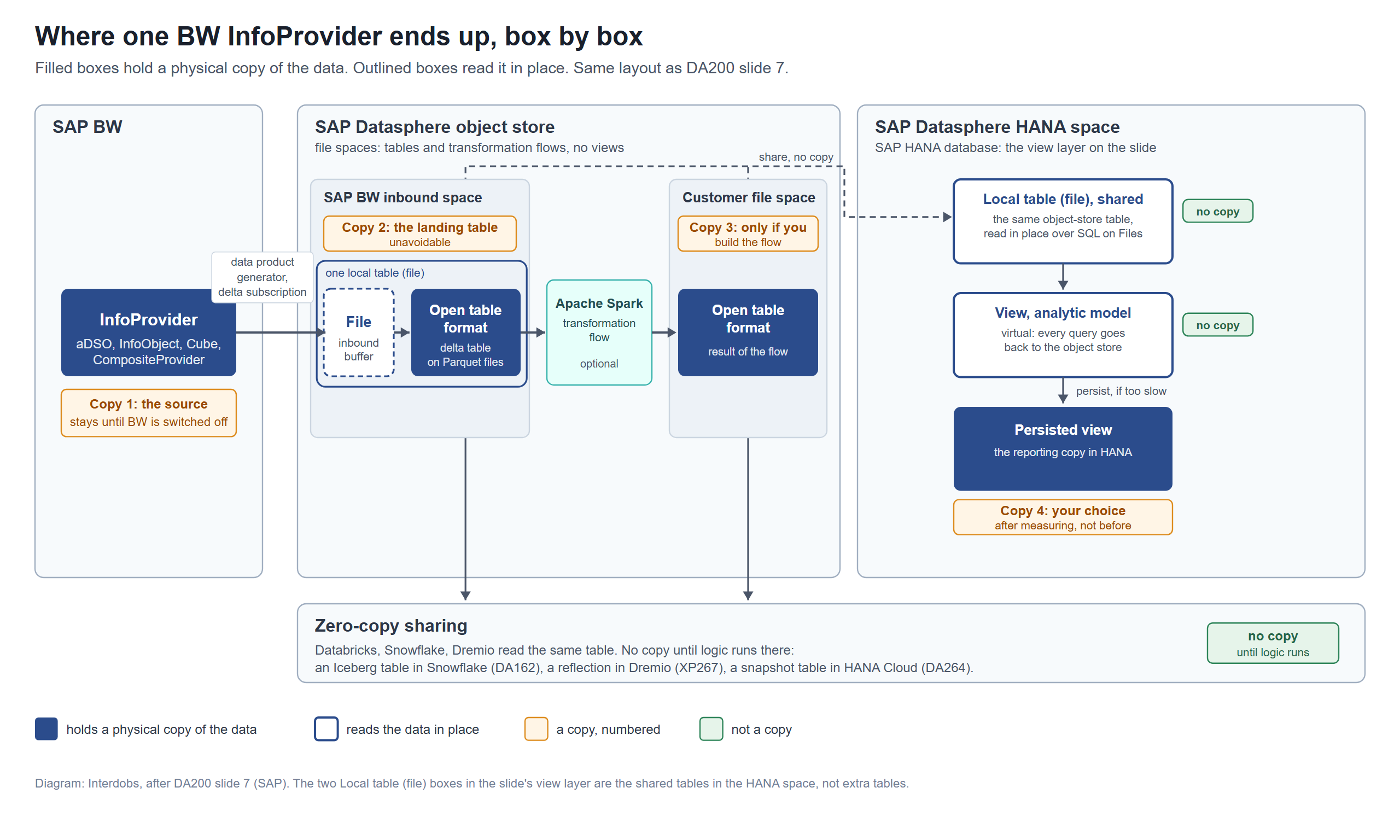
The same chain with the copies counted. Filled boxes hold data, outlined boxes read it in place. Diagram: Interdobs, after DA200 slide 7.
Open table format and Spark
Having worked mostly with HANA tables in the past, the “Open table format” was new to me. An open table format is a table layer on top of files in object storage. The rows sit in Parquet files, and a transaction log next to them records which files make up the current version of the table, what the schema is and what changed when. That log is what turns a folder of files into something with transactions, schema evolution and time travel. Three of them are common: Delta Lake, Apache Iceberg and Apache Hudi. Any engine that understands the format can read the table where it is. That is the whole idea behind zero-copy sharing. Databricks, Snowflake and Dremio don’t need a copy of the data, they just need the structure behind it.
Datasphere’s object store currently uses Delta Lake, the format that came out of Databricks. In a local table (file) the data is stored in a Delta Lake table in the SAP HANA Data Lake Files storage, with the versions tracked in a “_delta_log” folder. The merge job that empties the inbound buffer writes to the delta tables in the object store. An update rewrites Parquet files unless you switch on deletion vectors. Sharing runs over Delta Sharing.
At TechEd, SAP mentioned Iceberg often. Iceberg is a different open table format, which isn’t supported yet in BDC itself. It is on the road map. In DA802, SAP’s road map session for Business Data Cloud, the first announcement on slide 10 is “Lakehouse innovation for SAP BDC”: a native Apache Polaris catalog and distributed SQL queries across third-party lakehouses, with general availability planned for Q1 2027. Slide 11 names the engine behind it, SAP Dremio, for “in-place analytics on open table formats”, Iceberg among them. In other words, SAP is moving to more open standards. During the hands-on DA162 we got a preview of tables using Iceberg. We published a data product in BDC, consumed it in Snowflake, transformed it and published it back into BDC as a derived data product. Snowflake requires that table to be an Iceberg v3 table with copy-on-write, in Snowflake’s own storage. So, Iceberg is coming to BDC soon.
What that means for the local tables (file) we have today, I don’t know yet. I found nothing that says whether they will be converted, exposed as Iceberg or simply stay Delta, or both. Nor could I find whether that will be a setting, whether both formats will be written out of the box, or whether there will be a converter.
Finally, let’s have a look at Spark on the slide. It’s the compute engine that writes and transforms those tables. As Hannes Keil writes in his blog “Sizing the SAP Datasphere Object Store” (April 2026), the Apache Spark engine is “the compute for all operations, like creating delta tables, transformations, and housekeeping”, and SAP HANA native SQL on Files is “a bridge between the object store and the relational world of SQL”. So Parquet is the file, Delta is the format, Spark is the engine that does the writing.
What is the point of the HANA space then?
If all the data and the transformations can sit in the object store, why do we still need a HANA space? A file space holds tables and flows, not views. The only things you can create in the object store are local tables (file), replication flows and transformation flows. Views, analytic models and anything SAP Analytics Cloud connects to from BDC exist only in a HANA space, which runs on the SAP HANA database. So the “View layer” on the slide is just that: the kind of HANA space we are used to. The local tables (file) can be shared with HANA spaces, where they can be consumed by views, flows and analytic models. That share is the “Local table (file)” box in the view layer. The data doesn’t move. HANA reads it in place with SQL on Files.
This raises the question whether views are on the road map for the object store. I looked in SAP’s Road Map Explorer and in the 2026 What’s New list for Datasphere and found nothing on views in the object store. Everything SAP has shipped or planned for the object store is about tables and flows: file tables as sources and targets of replication flows, deletion vectors, twenty file spaces per tenant instead of five, a more flexible Python operator in Q4 2026, custom Python modules in Q1 2027, Spark-based replication flows in Q2 2027. So as of today: the views can only be built in a HANA space. If you have seen something that says otherwise, let me know.
What does that mean for virtual models? For ten years I’ve built virtual models on HANA over replicated tables. This design keeps the virtual model. It moves the base tables out of HANA memory into files, and the view reaches into them instead of into a column store, if you choose to go that route. The modeling doesn’t change. What changes is what you may expect from a query on it.
The query template generator
Slide 8 describes the query template generator. It translates a BW query into an analytic model “including fact source and reusable dimensions as a local table on an SAP HANA database for SAP Datasphere”. So that is HANA, not the object store. SAP Help says: “The Query Template Generator uses only HANA spaces as underlying storage for the generated objects”, and it keeps those targets separate from the file spaces the data product generator writes to. The query template generator moves metadata and leaves the choice of source to you: the BW data product you just pushed, or an SAP-managed product. What it generates is a dimension for each InfoObject with texts or hierarchies, one fact view for the InfoProvider, and an analytic model. The InfoObjects and fact view all get their own tables. Those local tables are empty until you connect them.
So if you use both generators on the same InfoProvider, you have its data in the object store, and its fact and dimension tables again in HANA, waiting to be filled from the object store. That is by design: HANA is the reporting tier and the object store is the landing zone.
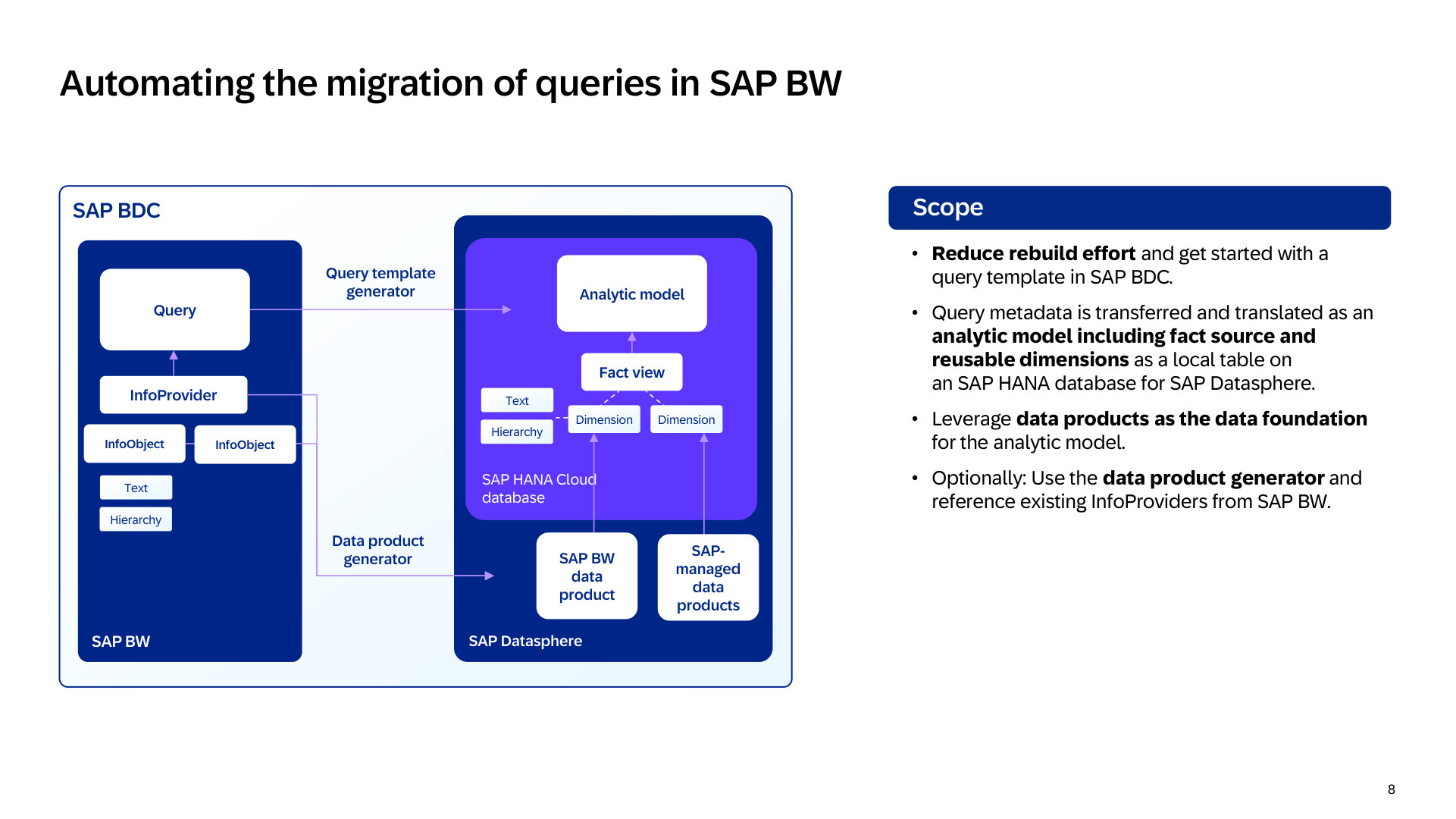
The query template generator lands in HANA. The data product generator lands in the object store. Same InfoProvider, two spaces. Slide: SAP, session DA200.
SAP is aware of this. The road map on slide 22 lists “Reuse of object store entities: remap the SAP HANA database of SAP Datasphere from the query template generator to entities that reside in the object store”, planned for Q4 2026. The entry in SAP’s Road Map Explorer says what the intent is: “Foster the usage of the object store as primary storage” and “Enable the saving of SAP HANA data to become optional, as this data will only be saved if explicitly requested”. SAP plans to point the fact view at the file table over SQL on Files and make the HANA copy an explicit choice. Whether the dashboards stay fast enough, we’ll find out. More on performance below. Until it ships, decide per InfoProvider what you want: the complete history in the object store, the reporting subset in HANA, or both.
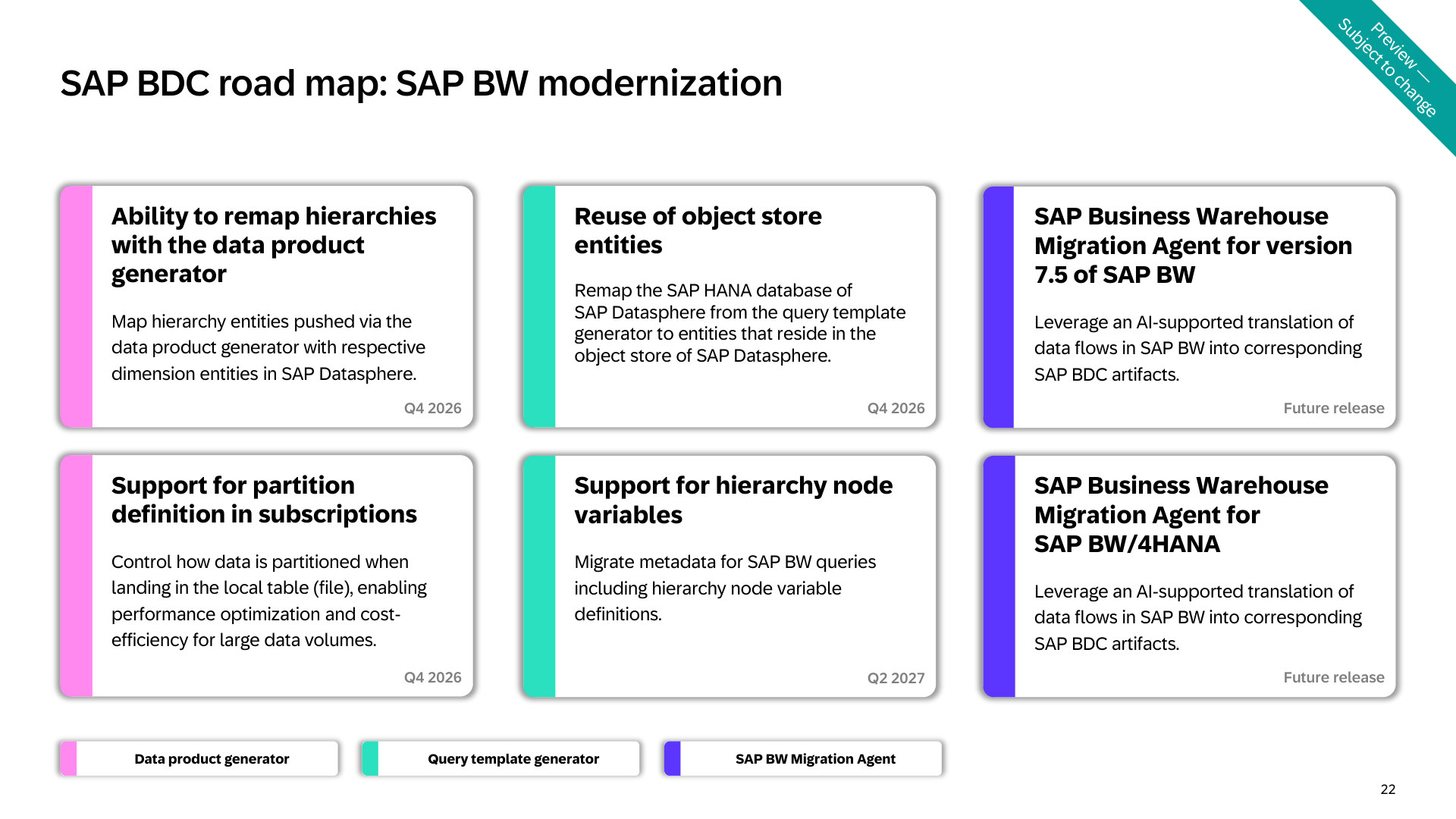
The Q4 2026 road map: hierarchy remap, reuse of object store entities, partitioning in subscriptions. Slide: SAP, session DA200.
Zero-copy, and the copies inside the landscape
Zero-copy was the buzzword at TechEd. And yet, counting on this slide, data gets copied inside SAP’s own landscape quite a bit: BW to the object store, object store to a second file space if you transform, object store to HANA if you persist, and the query template generator, which lands tables in HANA by design, as we saw earlier. It even goes the other way. Use a HANA table as a source in a file-space transformation flow and the system copies the data into the object store. That might feel contradictory. However, zero-copy only covers the read by another engine. Databricks, Snowflake and Dremio read the delta table where it is. Inside the landscape there are plenty of copies.
The hands-on sessions show the same thing. In DA162, mentioned above, the anomaly scores computed in Snowflake are written as an Iceberg table before they are shared back without a copy. In XP267, Dremio “has no CREATE MATERIALIZED VIEW”, so every view you want fast gets a Raw Reflection, “the physically stored, auto-maintained copy”, four of them in one exercise. And in DA264, SAP’s calculation view session, the slow part is stored in a snapshot table in HANA Cloud, so the query is faster. So zero-copy is real for the external read, but I don’t expect it to reduce the number of copies much.
The catch is performance
SQL on Files is a read from object storage, through HANA, at query time. My own results with the object store as primary storage are mixed, and I’m not the only one. Hannes Keil’s blog calls it a best practice “to create data marts in spaces with SAP HANA Cloud storage (local tables (HANA) or persisted views) for reporting scenarios with frequent use and SLAs requiring high-performance”. SAP Help describes file spaces as “an inexpensive inbound staging area”. And Jeet Kapase best practices on data tiering puts local tables (file) in the cold tier, for data that “is rarely accessed” and where you “can tolerate high latency”.
Fresenius drew the same conclusion on slide 18 of DA200: ingestion and transformation spaces on HANA data lake files as the bronze and silver layers, and a modeling space on the HANA database as the gold layer, with the fact view and the analytic model.
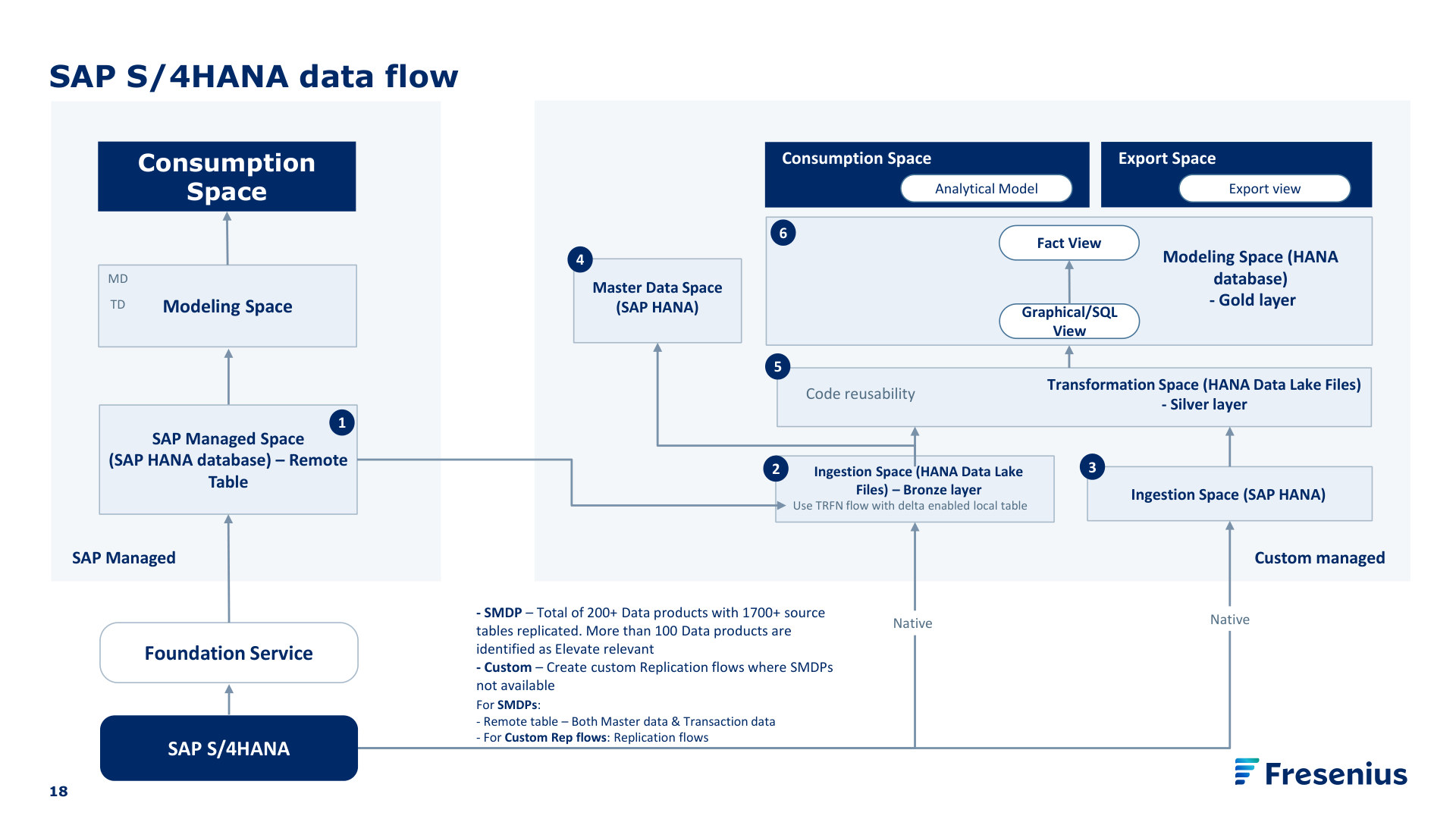
Fresenius’s target architecture: bronze and silver in the object store, gold on the HANA database. Slide: Fresenius, session DA200.
My take: read the file table in place for flows, transformations and anything that isn’t for your reports. For reporting, expect to persist into HANA. That is copy four, after BW, the landing table and the optional result of a transformation flow.
How this compares with the migrations we do today
The BW migrations to Datasphere that we’ve been a part of all first go into HANA. The data arrives through a replication flow, or a remote table set to replicate, into a local table in a HANA space. The transformations are rebuilt as views or transformation flows, an analytic model serves SAP Analytics Cloud, and a persisted view keeps it fast where it has to be. Count the copies and you get one in BW (until we turn it off), one in the landing table in HANA and one in the views we persist. SAP’s vision doesn’t shorten that chain. It puts the object store in front of HANA as a cheaper landing tier, and it lets the data product generator do the extraction from BW. The modeling between landing table and fact view stays ours, with the query template generator writing the first draft, and the reporting copy ends up where it ends up now. The situation as shown at TechEd is a happy flow. How will it look for more complex models? More on that in the next blog.
My conclusions, for now
- Accept two copies: BW and the landing table. Think critically about every other one.
- Read the shared local table (file) in place for flows and transformations. Persist into HANA for reporting, and only after you have measured that SQL on Files is too slow for the dashboards in question.
- Treat HANA as the hot tier for the reporting subset and the object store as the complete, cold history. Slide 4 of DA200 says “reduce and tier” for a reason, and SAP’s own tiering blog says the same.
- Know which copy the query template generator makes. Its HANA tables are the reporting copy, by design, until the object store remap ships.
- Share zero-copy to Databricks or Snowflake. Don’t replicate if you don’t need to.
SAP wants to stop moving data around. But as far as I can tell the copies didn’t disappear, some moved places. Compared with the migrations we do today, the landing zone gets cheaper. Whether I would put a dashboard directly on SQL on Files, I don’t know yet. I’ll decide that after measuring it, per InfoProvider, and I expect the answer will differ per customer and report. What are your experiences with the object store? I’d like to hear about them.
Questions about the SAP BW generators or the Datasphere object store? You can always contact us. We would like to hear from you.
Sources
- SAP TechEd 2026 session deck: DA200, Agentic SAP BW modernization: your path to SAP Business Data Cloud (slides 4, 7, 8, 18, 22). Slide 18 is Fresenius’s.
- SAP TechEd 2026 session deck: DA802, The future of the SAP Business Data Cloud solution: Data and AI road map (slides 10, 11).
- SAP hands-on exercises on GitHub (SAP-samples, Apache-2.0): github.com/SAP-samples/teched2026-DA162 (exercises 3 and 4), github.com/SAP-samples/teched2026-XP267, github.com/SAP-samples/teched2026-DA264.
- SAP Help Portal, SAP BW/4HANA:
- Setting Extraction Mode for the Data Product Generator: help.sap.com/docs/SAP_BW4HANA/ed919380760a44388ab90e6bb3e7480a/608b0cbeb8ce4a59a121563f12a91c43.html
- Viewing Local Table (File) and Getting Data Updates: help.sap.com/docs/SAP_BW4HANA/ed919380760a44388ab90e6bb3e7480a/c5b7a4fae2ce4b829914f9f825d6b471.html
- Query Template Generator for SAP Business Data Cloud: help.sap.com/docs/SAP_BW4HANA/3bd3e95817794c868ee49d4891a283e2/25518c7f04134b3f9ec6f52ddbb021ce.html
- Working with Generated Objects: help.sap.com/docs/SAP_BW4HANA/3bd3e95817794c868ee49d4891a283e2/544982c0e4e542ebb6374db9750a4c77.html
- SAP Help Portal, SAP Datasphere:
- Creating a Local Table (File): help.sap.com/docs/SAP_DATASPHERE/c8a54ee704e94e15926551293243fd1d/d21881b121bc4703861be6ead4aea2ab.html
- Monitoring Local Tables (File): help.sap.com/docs/SAP_DATASPHERE/be5967d099974c69b77f4549425ca4c0/6b2d0073a8684ee6a59d6f47d00ec895.html
- Merge or Optimize Your Local Tables (File): help.sap.com/docs/SAP_DATASPHERE/be5967d099974c69b77f4549425ca4c0/e533b154ed3e49ce9a03e4421a5296e7.html
- Capturing Delta Changes in Your Local Table (File): help.sap.com/docs/SAP_DATASPHERE/c8a54ee704e94e15926551293243fd1d/bfb51914340448f6acb51b70058aa28f.html
- Acquiring and Preparing Data in the Object Store: help.sap.com/docs/SAP_DATASPHERE/c8a54ee704e94e15926551293243fd1d/2a6bc3f6d79b4c39a01b6d58d043fbaf.html
- Create a File Space to Load Data in the Object Store: help.sap.com/docs/SAP_DATASPHERE/9f804b8efa8043539289f42f372c4862/947444683e524cfd9169d7671b72ba0c.html
- Creating a Transformation Flow in a File Space, note on SAP HANA tables as sources: help.sap.com/docs/SAP_DATASPHERE/c8a54ee704e94e15926551293243fd1d/b917baf0431343bea8381fa37e12eeb8.html
- What’s New in SAP Datasphere, releases 2026.2 to 2026.22: help.sap.com/whats-new/48017b2cc4834fc6b6cae87097bd9e4d
- SAP Help Portal, SAP HANA Cloud: SAP HANA Native SQL on Files Overview: help.sap.com/docs/hana-cloud-database/sap-hana-cloud-sap-hana-database-sql-on-files-guide/sap-hana-native-sql-on-files-overview.
- SAP KBA 3573719, on the merge job for local tables (file): userapps.support.sap.com/sap/support/knowledge/en/3573719.
- SAP Road Map Explorer, SAP Datasphere and SAP Business Data Cloud boards, read 3 November 2026: Query template generator: reuse of object store entities (Q4 2026); Enhanced flexibility in Python operator for Transformation Flow (Spark) (Q4 2026); Custom Python module support for Transformation Flow (Spark) (Q1 2027); Spark-based replication flows for SAP Datasphere embedded object store (Q2 2027).
- Hannes Keil, Sizing the SAP Datasphere Object Store, SAP Community, 17 April 2026: community.sap.com/t5/technology-blog-posts-by-sap/sizing-the-sap-datasphere-object-store/ba-p/14376790.
- Jeet Kapase, SAP Datasphere: Data Tiering Strategy and Best Practices, SAP Community, 7 June 2026: community.sap.com/t5/technology-blog-posts-by-sap/sap-datasphere-data-tiering-strategy-and-best-practices/ba-p/14376106.
- Snowflake documentation, Publish Data from Snowflake to SAP BDC Connect for Snowflake: docs.snowflake.com/user-guide/data-integration/zero-copy/sap-sql/publish-data.
Header photo: SAP SE, from the SAP News Center.
